


Best Displayport Cable
DisplayPort Cable Manufacturer
HD Era supplies DisplayPort cables for connecting compatible computers, graphics cards, monitors and other DisplayPort devices. The range includes different DisplayPort versions, cable lengths and connector configurations for desktop systems, high-resolution displays and multi-monitor installations.
For distributors, importers, computer accessory suppliers, system integrators and project customers, standard DisplayPort cable configurations can be supplied for regular sourcing, while selected cable specifications can be adjusted for specific equipment, product packaging or market requirements.


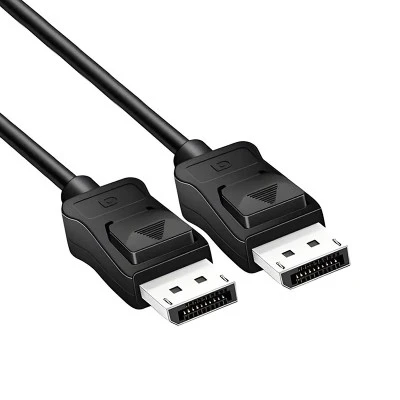
DisplayPort Cable Options
Different DisplayPort cables can serve different equipment and display requirements. The source device, monitor interface and required display performance should be considered together when selecting a cable.
DisplayPort 1.2
For compatible PCs, graphics cards, monitors and other devices using DisplayPort 1.2 connections.
This configuration is suitable for display systems where the source and monitor specifications are compatible with DisplayPort 1.2.
DisplayPort 1.4
For compatible systems requiring DisplayPort 1.4 capabilities, including suitable high-resolution and high-refresh-rate display applications.
The supported display performance depends on the capabilities of the connected source and display, so both devices should be checked before ordering.
High-Resolution DisplayPort
For direct connections between a DisplayPort source and a DisplayPort display, such as a graphics card and monitor.
This is a common configuration for desktop computers, workstation displays and multi-monitor systems.
Custom DisplayPort Cable
For bulk, OEM and project orders, cable length, connector details, cable construction, appearance and packaging can be specified according to the intended product or installation.
Match the Cable to the Display Requirement
Resolution and Refresh Rate
For high-resolution or high-refresh-rate displays, check the capabilities of the graphics card, computer, monitor and DisplayPort specification together. The cable should be suitable for the required connection rather than selected only by the advertised resolution.
01
Single-Monitor Connections
For a standard PC-to-monitor connection, confirm the DisplayPort output on the computer or graphics card and the DisplayPort input on the monitor, then select the appropriate cable length.
02
Multi-Monitor Systems
For multiple displays, check the available outputs on the graphics card and the inputs on each monitor. The required cable configuration may vary depending on how the displays are connected and which DisplayPort features the equipment supports.
03
Longer Cable Runs
When the cable needs to run through a desk, monitor arm, equipment cabinet or other installation space, cable length and construction become more important. A suitable length can help avoid unnecessary excess cable while keeping the installation practical.
04

Sample and Specification Confirmation
For customized DisplayPort cables, customers can provide product specifications, drawings, photos or an existing sample where available.
- Before bulk production, the key details can be confirmed, including:
- DisplayPort version and connector configuration
- Required cable length
- Cable construction and appearance
- Connector housing and locking design
- Branding and product identification
- Packaging and labeling
- Required quantity
Any project-specific testing or inspection requirements
This approach is particularly useful for private-label products, recurring distribution orders and project supply, where the same specification may need to be reproduced in future production batches.
FAQ
Q1: What is a DisplayPort cable used for?
A: DisplayPort cables are commonly used to connect compatible computers, graphics cards, monitors and other display devices for digital video and audio transmission.
Q2: What is the difference between DisplayPort 1.2 and 1.4?
A: DisplayPort 1.2 and DisplayPort 1.4 are different DisplayPort specifications with different supported capabilities. The appropriate cable should be selected according to the source device, display and required performance.
Q3: Can DisplayPort cables be used for multiple monitors?
A: They can be used in compatible multi-monitor configurations. The actual setup depends on the graphics card, monitor inputs and supported DisplayPort features.
Q4: Can you supply custom-length DisplayPort cables?
A: Yes. Cable length can be specified according to the equipment layout, installation requirements or product requirements.
Q5: Can the DisplayPort connector and cable appearance be customized?
A: For suitable projects, connector housing, locking design, cable diameter, cable color, jacket and other construction or appearance details can be reviewed.
Q6: Can you provide private-label DisplayPort cables?
A: Yes. Logo, product identification, labels, packaging and carton information can be customized for suitable private-label orders.
Q7: Can you make DisplayPort cables based on a sample or drawing?
A: Yes. Customers can provide an existing sample, drawing or product reference for specification review before production.
We are one of the most experienced best displayport cable manufacturers and suppliers in China, specialized in providing high quality customized service. Please feel free to wholesale cheap best displayport cable from our factory. Welcome to view our website for more information.
16k Displayport Cable, best displayport cable, Gold Plated Displayport Cable