


Introduction
Choosing the right PC gaming headset is about more than sound quality. Your connection type, microphone, comfort, and build quality can all affect your gaming experience. Whether you play competitive FPS games, talk with teammates, stream content, or simply want better audio from your computer, this guide will help you focus on the features that matter.
1. Start With the Right Connection
PC gaming headsets are available with USB, 3.5mm, and wireless connections. A USB gaming headset is convenient for PC users because it can offer simple plug-and-play setup. A 3.5mm gaming headset is widely compatible with computers and other audio devices. Wireless models provide more freedom of movement, while 2.4GHz wireless technology is designed for low-latency gaming.
Choose the connection based on your PC setup, gaming habits, and whether you also plan to use the headset with other devices.
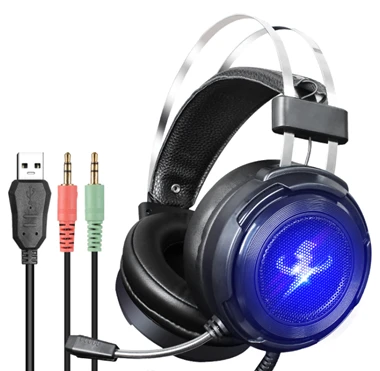
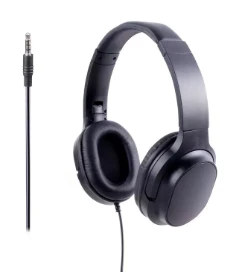
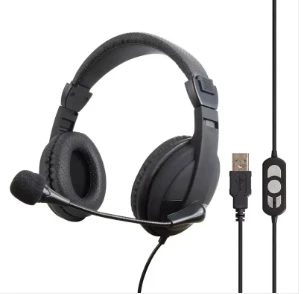
2. Consider Sound Quality and Positional Audio
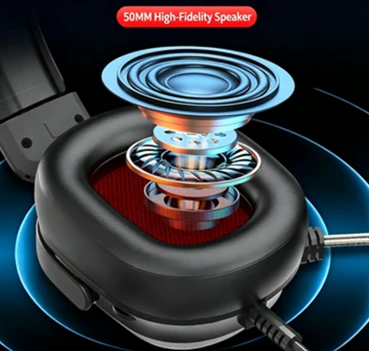
A good gaming headset should make dialogue, game effects, music, and important details easy to hear. Driver size is one specification to consider, but a larger driver does not automatically mean better sound. Tuning and acoustic design also have a major impact.
For competitive games, positional audio can be especially useful. Clear directional sound may help you distinguish where footsteps, vehicles, or other game effects are coming from.
For more detailed information about headset performance, you can also review independent PC gaming headset testing from RTINGS.
3. Don't Overlook the Microphone
If you play multiplayer games or use Discord, the microphone is just as important as the speakers. A good gaming headset with microphone should provide clear voice pickup without making your teammates struggle to understand you.
Look for features such as a well-positioned boom microphone, mute controls, and effective background-noise handling. If you also work from home or attend online meetings, microphone quality becomes even more important.
4. Comfort Matters for Long Sessions
A headset that sounds great can still be a poor choice if it becomes uncomfortable after an hour. Check the headset's weight, ear-cup size, padding, headband pressure, and adjustability.
Materials also matter. Soft ear pads and a flexible headband can make a noticeable difference during long gaming sessions. If possible, consider how the headset will feel after several hours rather than judging comfort only from its appearance.

5. Wired or Wireless: Which Should You Choose?
There is no single answer for every gamer. Wired headsets are convenient when you want a stable connection without worrying about battery life. Wireless headsets are useful when you prefer a cleaner desk and freedom of movement.
For competitive gaming, pay attention to latency and connection stability. For casual gaming, music, and everyday computer use, convenience may be more important.
The best gaming headset for PC is therefore the one that matches how you actually use your computer.
6. What Should B2B Buyers Look for in a Gaming Headset Supplier?
For brands, distributors, wholesalers, and other bulk buyers, choosing a PC gaming headset involves more than comparing retail specifications.
A reliable PC gaming headset manufacturer should be able to discuss product specifications, samples, quality control, production capacity, packaging, branding, and delivery requirements. Businesses looking for an OEM gaming headset or private-label gaming headset should also ask about customization options and minimum order quantities.
HD Era provides PC headphones and headsets for gaming, office, education, and communication applications, with OEM/ODM manufacturing support for B2B customers.
7. Quick PC Gaming Headset Buying Checklist
Before choosing a headset, check these seven points:
Does it work with your PC?
- Which connection do you need?
- Is the sound suitable for your games?
- Is the microphone clear enough?
- Will it remain comfortable during long sessions?
- Is the construction suitable for your expected use?
- Does the price match the features you actually need?
If you are sourcing headsets for a brand, distribution business, or bulk project, you can also request a quote for product and customization requirements.
FAQ
1. What is the best type of PC gaming headset?
The right headset depends on your gaming style, connection preference, microphone needs, comfort requirements, and budget.
2. Is USB or 3.5mm better for PC gaming?
USB is convenient for PC use, while 3.5mm provides broad compatibility. Neither connection is automatically better for every user.
3. Are wireless gaming headsets good for PC gaming?
Yes. A suitable low-latency wireless headset can provide a convenient experience while allowing more freedom of movement.
4. Does a larger headset driver mean better sound?
Not necessarily. Driver size is only one part of audio performance. Tuning, acoustic design, and construction also matter.
5. Do I need a gaming headset with a microphone?
If you use voice chat, Discord, streaming, or online meetings, a good microphone can be very useful.
6. What makes a gaming headset comfortable?
Weight, ear-pad material, headband pressure, ear-cup size, and adjustability all contribute to long-term comfort.
7. Can gaming headsets be customized for a private-label brand?
Yes. Depending on the manufacturer, customization may include product specifications, branding, packaging, and other OEM/ODM requirements.