

In today's digital age, the lines between different devices are becoming increasingly blurred. One common question that tech enthusiasts often ask is, "Can I use a computer headset for gaming on a smart TV?" As a supplier of high - quality computer headsets, I'm here to provide you with a comprehensive answer to this question.
Compatibility Considerations
Before determining whether you can use a computer headset for gaming on a smart TV, you must first examine the compatibility between the two. Computer headsets typically come with various types of connectors, such as USB, Type - C, and the standard 3.5mm audio jack. On the other hand, smart TVs offer different audio output options, including HDMI ARC (Audio Return Channel), optical audio, and the ever - present 3.5mm audio jack.
If your smart TV has a 3.5mm audio output port, it significantly simplifies the process. Many of our Computer Headset with Microphone feature a 3.5mm connector, which can be directly plugged into the TV's audio port. This straightforward connection allows you to enjoy audio from your smart TV games right away. The only thing you need to ensure is that the headset's audio format is supported by the TV, which is usually the case for most modern headsets and TVs.
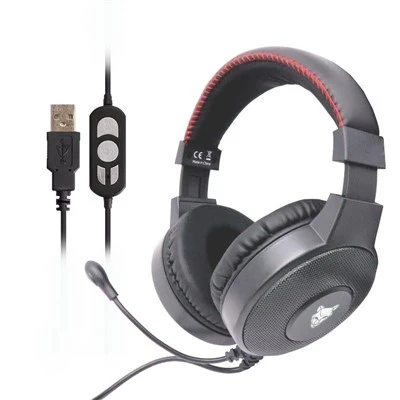
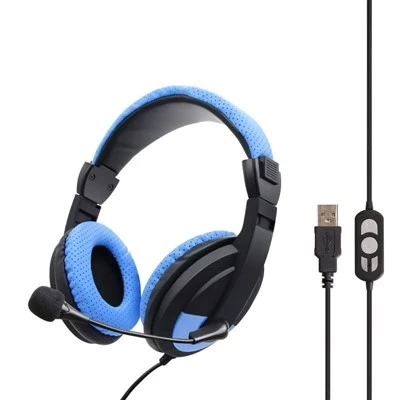
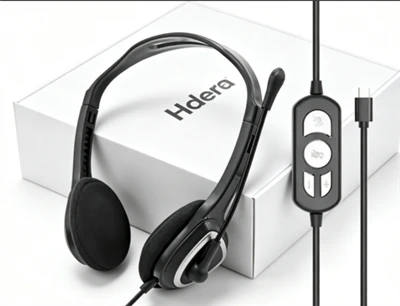
However, if your TV lacks a 3.5mm audio port, you'll need to explore other options. For example, if your headset uses a USB connection, you can look for a USB - to - audio adapter that is compatible with your smart TV. Our USB Plug AM Computer Headset can be used with such an adapter to connect to a TV. Similarly, for Type - C headsets like our Type C Computer Headset, you may need a Type - C to audio adapter, depending on your TV's available ports.
Sound Quality and Performance
When using a computer headset for gaming on a smart TV, sound quality is a crucial factor. Computer headsets are designed to provide an immersive audio experience for various applications, including gaming. They often feature advanced sound technologies such as surround sound, noise - cancellation, and high - fidelity audio reproduction.
Surround sound is particularly beneficial for gaming, as it can create a three - dimensional audio environment that allows you to accurately locate in - game sounds. For example, you can hear the footsteps of an approaching enemy from behind or the direction of a distant explosion. Many of our computer headsets are equipped with surround sound technology, which can enhance your gaming experience on a smart TV as well.
Noise - cancellation is another important feature. In a gaming setting, it can help you focus on the game's audio by reducing background noise. Whether you're in a noisy room or your TV's speakers are producing some ambient noise, a headset with noise - cancellation can improve the overall audio quality and your immersion in the game.


However, it's important to note that the performance of the headset may also depend on the audio processing capabilities of your smart TV. Some high - end smart TVs have advanced audio processing engines that can further enhance the sound quality of the connected headset. In contrast, older or more basic TVs may not provide the same level of audio optimization.
Microphone Functionality
For multi - player and online gaming on a smart TV, the microphone functionality of the headset is essential. Most computer headsets come with a built - in microphone, which allows you to communicate with other players. Our Computer Headset with Microphone are specifically designed to provide clear and crisp voice transmission.
When using a headset microphone on a smart TV, you need to ensure that the TV can recognize and use the microphone input. Some smart TVs may require you to adjust the audio settings to select the headset microphone as the input device. Additionally, the quality of the microphone can affect your communication with other players. A good quality microphone will reduce background noise and deliver your voice clearly, preventing any misunderstandings during gaming sessions.
Setup and Configuration
Setting up a computer headset for gaming on a smart TV may require some configuration steps. First, connect the headset to the TV using the appropriate adapter or cable. Once connected, turn on your smart TV and access the audio settings menu. In this menu, you should be able to select the connected headset as the audio output device.
If you're using a headset with a microphone, you'll also need to configure the microphone settings. This may involve adjusting the microphone volume, sensitivity, and sometimes setting the microphone as the input source. Each TV model has different menu layouts, so it may take a bit of time to find and adjust these settings correctly.
Advantages of Using a Computer Headset for Smart TV Gaming
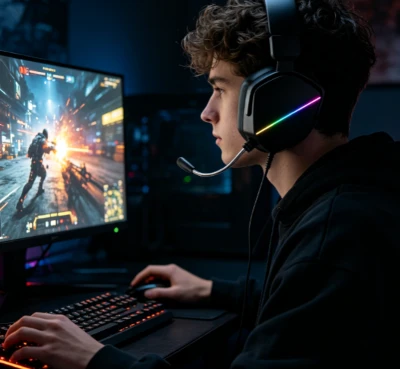
There are several advantages to using a computer headset for gaming on a smart TV. Firstly, it provides a more immersive audio experience compared to the TV's built - in speakers. The high - quality sound and advanced features of computer headsets can bring games to life, allowing you to fully engage with the game environment.
Secondly, using a headset allows you to play games without disturbing others. This is especially useful if you're playing late at night or in a shared living space. You can enjoy your games at a comfortable volume without worrying about the noise affecting other people in the household.
Finally, computer headsets offer greater portability. You can easily move the headset between your computer and smart TV, depending on your gaming needs. This flexibility is convenient for gamers who like to switch between different platforms.

Conclusion
In conclusion, in most cases, it is possible to use a computer headset for gaming on a smart TV. With the right connectors and proper configuration, you can enjoy high - quality audio and clear communication during your gaming sessions. As a computer headset supplier, we offer a wide range of headsets with different connectors and features to meet your needs.
If you're interested in purchasing high - quality computer headsets for your smart TV gaming or other applications, we invite you to contact us for procurement discussions. We're committed to providing the best products and services to enhance your gaming experience.
References
- "Audio Technology in Modern Gaming Devices" - Journal of Audio and Video Technology
- "User Guide to Smart TV Audio Settings" - Tech Gadget Handbook Series