


Introduction
A 144Hz monitor needs the right connection to run at its intended refresh rate. If you are using an older gaming monitor with DVI, choosing a cable based only on its appearance can lead to a common problem: the monitor works, but only at 60Hz.
The key is to check your monitor resolution, DVI port, graphics card output, and cable type. For many older 1080p 144Hz monitors, a compatible Dual Link DVI-D connection is required.
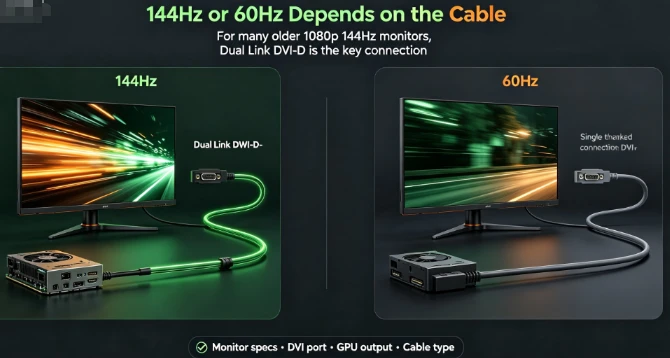
Does DVI Support 144Hz?
Yes, some DVI connections can support 144Hz, but not every DVI cable or DVI port is suitable.
For example, Intel states that 1920×1080 at 144Hz requires sufficient bandwidth and can be supported through DVI-D at a Dual Link rate when the complete hardware setup supports it. Intel also lists a higher bandwidth requirement for 1080p at 144Hz than for 1080p at 60Hz.
This means you should check the entire connection:
- Monitor input
- Graphics card output
- DVI connection type
- Cable specification
- Resolution and refresh rate
A cable alone cannot make unsupported hardware run at 144Hz.
The Most Important Choice: Single Link vs Dual Link DVI
For many older 144Hz gaming monitors, this is the most important buying decision.
1. Single Link DVI
Single Link DVI uses fewer data channels and provides less bandwidth. It is suitable for many standard display connections, but it may not support the mode required by a monitor designed to run at 1920×1080 and 144Hz through DVI.
If your monitor manual specifically says that Dual Link DVI is required for 144Hz, do not replace the original connection with a Single Link cable.
2. Dual Link DVI
Dual Link DVI uses additional data channels to provide more bandwidth. Many earlier 1080p 144Hz gaming monitors were designed around this connection.
For example, ASUS lists Dual-Link DVI-D as one of the display connections on its VG248QE 144Hz monitor. ASUS documentation for another monitor also states that only a DVI-D Dual Link cable supports 1920×1080 at 144Hz on that model.
If your monitor specifically requires this type of connection, a compatible DVI 24+1 Cable is a practical option for digital-only Dual Link DVI-D systems.


DVI-D 24+1 vs DVI-I 24+5: Which Should You Choose?
The connector must match your equipment. More pins do not automatically mean better 144Hz performance.
| Connector | Signal Type | Best Choice |
|---|---|---|
| DVI-D 24+1 | Digital | Compatible digital DVI connections |
| DVI-I 24+5 | Digital and analog capability | Equipment that specifically uses DVI-I |
A DVI 24+1 Cable is generally the appropriate choice when both the monitor and graphics card use compatible DVI-D digital connections.
A DVI 24+5 Cable may be useful when your equipment specifically requires DVI-I compatibility. However, choosing 24+5 simply because it has additional pins will not automatically improve refresh rate performance.
Always match the cable to the actual port and required signal type.
Check Your Monitor and Graphics Card Before Buying
Before ordering a DVI cable for a 144Hz monitor, check these five points:
1. Does the Monitor Support 144Hz Through DVI?
Some monitors support their maximum refresh rate through only certain inputs. Check the monitor manual or official specifications.
2. Does It Require Dual Link DVI?
This is especially important for older 1080p 144Hz gaming monitors. Look for terms such as "Dual-Link DVI-D" in the specifications.
3. What Type of DVI Output Does Your Graphics Card Have?
Check whether the graphics card has a compatible DVI-D or DVI-I output. A physical connector match does not guarantee that every refresh-rate mode is supported.
4. What Resolution Will You Use?
Higher resolution and higher refresh rates require more bandwidth. Your source, monitor, and cable must support the required display mode.
5. Are You Using an Adapter?
Adapters can change compatibility. Do not assume that an adapter or conversion cable will provide the same result as a direct Dual Link DVI connection.
How to Identify a Real Dual Link DVI Cable
Do not choose a cable based only on product photos.
Check whether the manufacturer clearly states:
- Dual Link DVI
- DVI-D 24+1 or the required connector type
- Supported display specifications
- Cable length
- Compatibility information
The pin layout can help identify connector configurations, but the product specification is still important. For a 144Hz application, make sure the cable is described as suitable for the required Dual Link connection rather than simply labeled "DVI cable."
For OEM buyers and distributors, it is also useful to confirm cable construction, connector quality, shielding, and available custom lengths before placing a bulk order.
Can HDMI to DVI Support a 144Hz Monitor?
Not automatically.
An HDMI to DVI 24+1 Cable or HDMI to DVI 18+1 Cable may be useful for compatible video connections, but HDMI-to-DVI solutions should not be assumed to replace a required native Dual Link DVI connection for 144Hz.
The result depends on:
- HDMI output capability
- DVI input capability
- Cable or adapter design
- Monitor requirements
- Resolution and refresh rate
If your monitor manual specifically requires Dual Link DVI for 144Hz, verify the complete signal path before buying an HDMI-to-DVI cable.


Common Mistakes When Buying a DVI Cable for 144Hz
Avoid these common problems:
- Buying Single Link DVI when the monitor requires Dual Link
- Choosing DVI 24+5 only because it has more pins
- Ignoring the graphics card output specification
- Assuming every HDMI-to-DVI cable supports 144Hz
- Expecting a cable to increase unsupported hardware performance
- Using an adapter without checking its refresh-rate capability
- Buying a very long cable without considering the installation requirements
The safest approach is to check the monitor manual first and then match the cable to the exact connection requirement.
Quick Buying Checklist
Before buying, ask:
- Does my monitor support 144Hz through DVI?
- Does it specifically require Dual Link DVI-D?
- Does my graphics card support the required output mode?
- Does the cable clearly match the required connector and specification?
For many older 1080p 144Hz monitors, a compatible Dual Link DVI-D connection is the key requirement.
Conclusion
Choosing the right DVI cable for a 144Hz monitor is mainly about compatibility, not simply buying the cable with the most pins.
For many older 1080p gaming monitors, the correct solution is a compatible Dual Link DVI-D connection. Check your monitor specifications, graphics card output, resolution, and required refresh rate before ordering.
A properly matched DVI cable helps your compatible hardware deliver the display mode it was designed to support.
FAQ
1. Can a DVI cable support 144Hz?
Yes. Some DVI connections can support 144Hz, depending on the monitor, graphics card, resolution, and connection type.
2. Do I need Dual Link DVI for 144Hz?
Many older 1080p 144Hz monitors specifically require Dual Link DVI. Check your monitor manual or official specifications.
3. Is a DVI-D 24+1 cable suitable for 144Hz?
A compatible Dual Link DVI-D 24+1 cable can be suitable when your monitor and graphics card support the required display mode.
4. Is DVI 24+5 better than 24+1 for 144Hz?
Not necessarily. The correct connector depends on your equipment. Additional analog pins do not automatically provide better 144Hz performance.
5. Can Single Link DVI run a 144Hz monitor?
It depends on the resolution and hardware, but many older 1080p 144Hz monitors require Dual Link DVI.
6. Can HDMI to DVI support 144Hz?
Not automatically. Check the complete connection path and your monitor requirements before using an HDMI-to-DVI solution for 144Hz.
7. Will a better DVI cable make my monitor run at 144Hz?
No. A cable cannot increase the maximum refresh rate supported by your monitor or graphics hardware.
8. How do I know which DVI cable to buy?
Check your monitor's port type, required connection, maximum resolution, refresh rate, and graphics card output. Then select a cable that clearly matches those requirements.
9. Can a 4K DVI cable be used for a 144Hz monitor?
Only if its actual connector design and specifications are compatible with your devices. The label "4K" alone does not guarantee support for a particular 144Hz display mode.